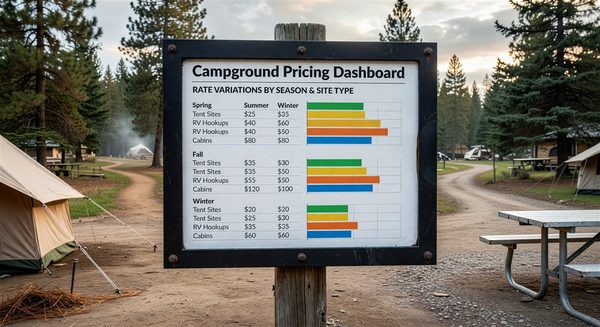
Setting rates by gut feel — or worse, just setting one rate for the whole season and calling it done — costs campground operators real revenue. Guests have dramatically different willingness to pay depending on the time of year, day of week, and proximity to major holidays. A pricing calendar that reflects these patterns captures more of that value while keeping your off-peak inventory moving.
Building a structured seasonal pricing calendar doesn’t require sophisticated software. You can implement one effectively in even the simplest reservation systems with the right framework.
Start With Your Demand Seasons
Most campgrounds operate across three or four distinct demand seasons. Map yours before setting any rates:
Peak season: The period of highest demand. For most North American campgrounds, this is Memorial Day weekend through Labor Day. Within peak season, holiday weekends (Fourth of July, Labor Day itself) are sub-peaks.
Shoulder season: Periods of moderate demand surrounding the peak. Often early May and September through October for northern parks; March–April and November for southern parks.
Off-season: Low demand periods where occupancy requires deliberate pricing support. In colder climates, this is typically October through April.
Some parks also have micro-seasons driven by local events — leaf-peeping weekends, regional festivals, hunting seasons — that create demand spikes within otherwise slow periods.
Rate Layers to Configure
A pricing calendar typically has several rate layers that stack to produce the nightly price:
Base rate by site type. Your standard rate for each site category (tent, 30A hookup, 50A hookup, cabin, etc.) in the shoulder season.
Seasonal adjustment. Peak season multiplier or flat increase applied to base rates during high-demand periods.
Weekend rate. A Friday–Saturday premium applied above the weekday base rate. Typically 15–30%.
Holiday rate. Additional premium for the specific holiday weekend nights. Fourth of July, Memorial Day, and Labor Day weekends in peak season often warrant rates 20–40% above standard peak weekend rates.
Off-peak rate. A discount from base rate for weekday, shoulder, or off-season bookings to stimulate demand.
Building the Calendar in Your Reservation System
Most reservation platforms support date-specific or date-range pricing. The setup process typically looks like:
- Set your base rates by site type
- Define peak season dates (e.g., May 25 – September 1) and apply a peak multiplier
- Define holiday weekends as specific date ranges with holiday rate overrides
- Set weekend premium rules (Friday and Saturday nights) that stack on top of seasonal rates
- Define shoulder season rate adjustments that bring rates below peak but above off-season base
- Set off-season rates for your lowest-demand periods
Test the output by searching availability across your calendar and confirming that rates display correctly for representative dates in each tier. Look for unintended gaps or rate anomalies.
Using Historical Data to Set Rate Levels
If you’ve been operating for at least one full season, your historical occupancy data is invaluable for calibrating rates:
- Periods where you regularly hit 90%+ occupancy: You’re likely underpriced. Test rate increases to see whether occupancy holds.
- Periods where occupancy falls below 60%: You may be overpriced, or your marketing in that period is insufficient. Test modest rate decreases and measure lift.
- Periods with very high last-minute cancellations: Consider whether your deposit policy adequately protects you on these dates.
If you don’t have historical data yet, industry benchmarks from similar parks in your region can provide a starting framework. Your nearest competitors’ posted rates are a useful calibration point.
Minimum Stay Rules and the Pricing Calendar
Minimum stay requirements should coordinate with your pricing calendar:
- Peak holiday weekends: 3-night minimums prevent single-night gaps that are impossible to fill
- Standard peak weekends: 2-night minimums during summer
- Shoulder season and off-season: No minimums — flexibility encourages bookings in slow periods
Some operators also use minimum stay as a revenue management tool: requiring 5–7 night minimums during peak season encourages longer bookings with higher total revenue per reservation.
Frequently Asked Questions
How frequently should I update my pricing calendar? Review your pricing calendar at least annually — before each season opens for booking. Also review mid-season if occupancy is tracking significantly above or below your targets.
Should I publish my seasonal rates in advance or only show pricing when guests search availability? Most parks show rates through the booking interface at search rather than publishing a public rate card. This gives you flexibility to adjust without creating expectations based on published rates. However, showing a clear rate structure (e.g., “rates vary by season — check availability for current pricing”) sets appropriate guest expectations.
What happens to existing reservations when I update rates? Rate changes should never affect bookings already in the system. Your new rates apply only to new reservations made after the rate update. Confirm this behavior with your PMS before making changes.
How do I handle guests who ask why the rate is different than when they last visited? Be transparent: “Our rates vary by season and availability. The rate on your reservation reflects current conditions.” Most guests accept this framing — they understand hotel pricing works this way. Guests who are genuinely upset about a rate increase are often best handled with a modest goodwill gesture on-site rather than a pricing debate.
Further Reading from Authoritative Sources
- ARVC campground pricing strategy and seasonal demand guidance — ARVC provides pricing and revenue management guidance for campground operators and publishes industry data on seasonal demand patterns that inform how operators structure their seasonal pricing calendars.
- Yield management and seasonal pricing strategy overview — Wikipedia’s yield management article provides the foundational concepts of demand-based pricing and inventory segmentation by time period that underpin campground seasonal pricing calendar design.